Programming in R
Writing Good Code
Before writing scripts, here a few suggestions on how to organize and format your code:
Names
Use descriptive and short file names for your scripts. Likewise, choose informative names for your objects and functions; use underscore (_) or dots (.) to separate words.
# good object names (use nouns!)
my_variance
radius
body.mass
# bad object names
tmp5
foo
good
To avoid confusion, never call your objects
I # uppercase i
O # uppercase o
o # lowercase O
l # lowercase L
Good function names are informative:
calculate_cv
random_time_series
Bad (i.e., uninformative) function names are
f1
faster_version
this_works_well
Spacing and Parentheses
Put a space before and after an operator (the only exception is a colon), and before a left parenthesis (function arguments are the only exception). Add a space after each comma, but not before. A white line separates functions. Use parentheses to make complex calculations easier to understand.
# good
x <- 5 * 7
y <- 7 * (x ^ 2)
m <- matrix(25, 5, 5)
z <- mean(x, na.rm == TRUE)
i <- t + 1
z <- (x * y) + (x2 * y2)

if (b == 5) {
  do(something)
} else {
  do(something_else)
}

# bad
x<-5*7 # hard to read
y <- 7*x^2
m <- matrix(25 , 5 , 5) # but m is not very informative name
Loops
An important way to modify the flow of a program is to write a loop. A loop is a series of commands that are repeated a number of times. For example, you want to iterate the same calculation many times to produce a population dynamical time series, or you want to run the same analysis on different data sets that you have collected, etc.
R provides you with two ways to loop over blocks of commands: the for loop, and the while-loop. Let’s start with the for-loop, which is used to iterate over a vector (or a list): for each value of the vector, a series of commands will be run.
for-loops
The the anatomy of a for-loop is:
for (variable in list_or_vector) {
  execute these commands # if there is more than one command each has to start on a new line
}
Here is a simple example.
myvec <- 1:10 # vector with numbers from 1 to 10
for (i in myvec) {
  a <- i ^ 2
  print(a)
}
In the code above, the variable i takes the value of each element in the vector myvec in sequence. Inside the in the for-loop, you can use the variable i to perform operations. Note that i is only an example of a variable name. Note also that in a for-loop each new command has to start on a new line. This is essential! The same applies to the other looping constructions and to functions.
We can visualize to the logic of the for-loop using a flow chart.
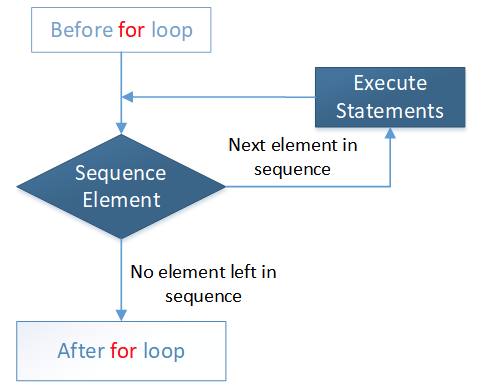
Thus, each time the loop is executed, R moves to the next entry in the vector, until no entry is left. This is when the loop stops. As a slightly less trivial example, let us calculate the factorials of n, \(n! = 1 * 2 * ... * (n-1) * n\) using a for-loop.
result <- 1
for (i in 1:6) {
  result <- result * i
  print(result)
}
Let us come to ecology and use the for-loop to compute the time series of an exponentially growing population.
lambda <- 1.1 # the assumed value for lambda
tmax <- 15 # length of the time series
N0 <- 10 # initial population size
n <- c() # creates an empty vector in which we can store the data of the time series
n[1] <- N0 # stores the initial population size as the first entry of the vector n
for (t in 1:tmax) {
  n[t+1] <- n[t] * lambda
}
n
plot(n)
Note that the vector in the for-loop need not to be a vector of the first n natural number.
for (i in seq(2, 5, 0.5))
{
    print(i)
}
## [1] 2
## [1] 2.5
## [1] 3
## [1] 3.5
## [1] 4
## [1] 4.5
## [1] 5In summary, a for-loop is used when you know that you want to perform the analysis using a given set of values (e.g., run over for a fixed number of iterations).
while-loops
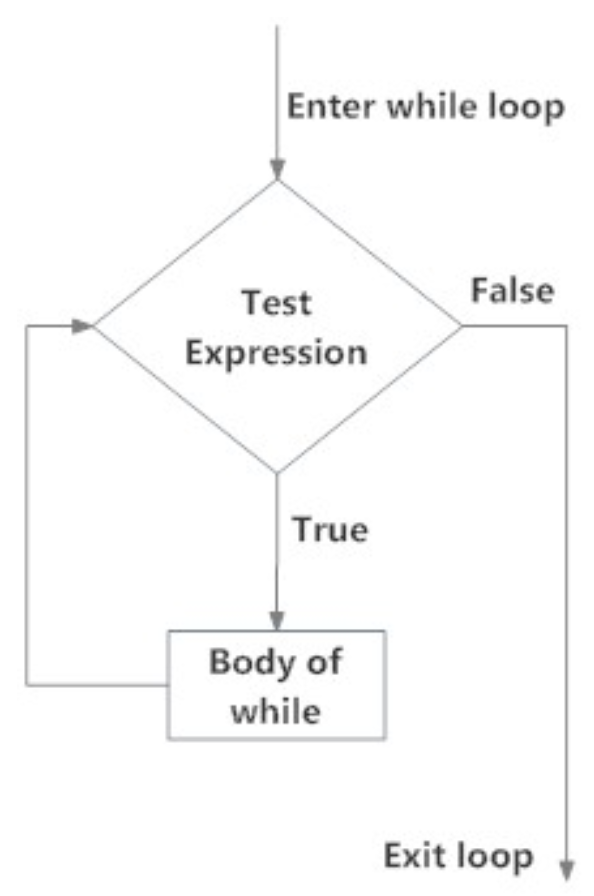
The while-loop is used when the statement in the loop needs to be repeated as long a certain condition is true. The anatomy of the while-loop is
while (test expression is TRUE) {
  execute these commands and update the test expression (body of the while loop)
}
We can visualize to the logic of the while-loop with the following flow chart.
For example,
result <- 1
i <- 1
while (i <= 6) {
  result <- result * i
  print(result)
  i <- i + 1
}
This script performs exactly the same operations we wrote with the for-loop above. But the while-loop is more complicated. First, we have to initialize the value i outside of the while-loop. Second, we have to update the value of i inside the while-loop. This is crucial! What would happen if the last step would be omitted? The loop would run forever (infinite loop — to terminate click on the “Stop” button in the top-right corner of the console window in RStudio). Thus, programming with while-loops is more error-prone. Thus, if you can achieve the same goal with a for-loop, then the for-loop is to be preferred.
But first, lets get some practice with the while-loop.
Exercises
Write a while-loops that produces exactly the same population dynamical time series as above.
Assume \(\lambda < 1\). In this case, the population will shrink and should ultimately go extinct. Let us a define a population as extinct whenever the population size has dropped below 1. Write a while-loop that runs exactly as long as it takes for the population to go extinct (hint: you have to use the condition for non-extinction n[t]>1 as the test-expression in the while loop). What is the easiest way to determine how long it takes for the population to go extinct?
What does this code do? Try to understand what the loop does, and then create and run a script to confirm your intuition.
z <- seq(1, 100, by = 3)
for (k in z) {
   if (k / 4 < 10) {
    print(k)
  }
}if-statements
Not a loop but another important way to modify the flow of your program: if-else-constructs allows us to make the execution of commands conditional. The function if (test) "output if TRUE" else "output if FALSE" contains a logical test, and yes and no are output conditional of whether the logical test results in TRUE or FALSE: if the test evaluates to TRUE, this command returns whatever is written in the next position, and if test evaluates to FALSE, this command returns whatever is written in the last position. Here two simple examples:
x <- 2
if (x > 0) "positive" else "negative or 0" # this returns "positive"

a <- 1
b <- 2
if (a > b) 1 else 0 # this returns 0
If we want to incorporate more than one logical test we can nest several if-else-constructs as in the following example:
x <- 0
if (x < 0) "Negative number" else
    if (x > 0) "Positive number" else
      "Zero"
Alternatively, the command ifelse(test, "output if TRUE", "output if FALSE") can be used for the same task:
x <- 2
ifelse(x > 0, "positive", "negative or 0")
Functions
Functions are R objects designed to perform operations on other objects. Each time you evaluate a command in R, one or several functions are executed. An R function is typically called by its name followed by parentheses. Inside the parentheses, the user must pass the arguments required by the function. We have already described several built-in functions previously, such as c(), log(), and matrix(). What makes R a powerful programming language is that you can define your own functions. These are called user-defined functions.
Here is the general anatomy of a function:
my_func_name <- function([optional arguments]) {
  operations
  return(value) [optional]
}
For instance,
circle.area <- function(radius) {
  pi * radius^2
}
defines a function called circle.area which takes as input argument a variable called radius and returns the value \(pi \times radius^2\) (here pi is the constant \(\pi=3.14\ldots\)), which is indeed the formula for the surface area of a circle. The code of the function is contained between the curly brackets. At the end, a value may be returned.
After submitting the function to R, we can call this function to calculate the surface of circles with given radius.
circle.area(2)

circle.area(1:5) # We can apply the function to the numbers 1 to 5 in a single step; thus, we apply functions to a vector of radii.
Some functions may have more than one argument and may return more than one value:
rectangle <- function(side_1, side_2){
  circumference <- 2 * side_1 + 2 * side_2
  surface <- side_1 * side_2
  return(list(circumference = circumference, surface = surface))
}

rectangle(2, 3)
Here, the output of the function is presented in a named list.
It is often useful to explore functions by plotting them (see next section):
curve(circle.area(x), from = 0, to = 2, xlab = "radius", ylab = "circle area")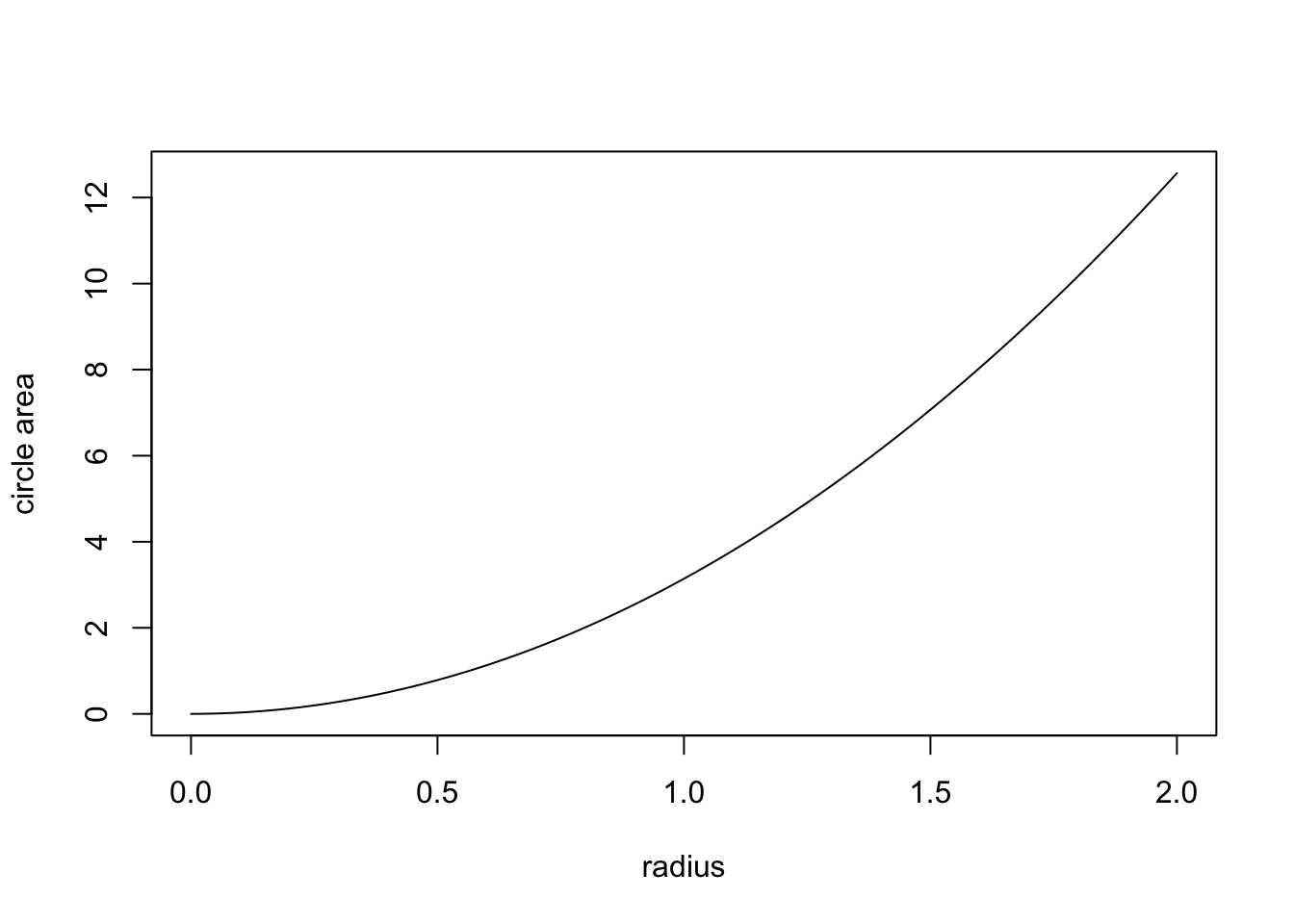
Exercise: Plot the area of a rectangle as a function of side_1 (with side_1 between 0 and 2) given that side_2=2.
Functions can be arbitrarily complex and most simulation models will have a more or less complex function at their heart. For instance, we can incorporate loops and iflese-constructs into functions.
sign_of_a_number <- function(x){
  if (x < 0) {print("Negative number")} else
    if (x > 0) {print("Positive number")} else
      print("Zero")
}

sign_of_a_number(2.3)
To calculate the factorial more easily, we can wrap a function around the while loop from the previous section:
my.factorial <- function(n){
  result <- 1
  i <- 1
  while (i <=  n){
    result <- result * i
    i <- i + 1
  }
  result
}

my.factorial(4)
Let us code a function that produces a population dynamical time series for exponential growth in discrete time.
time.series <- function(tmax, lambda, N0){
  n <- c(N0) # creates a vector with the initial population size N0 in its first position
  for (t in 1:tmax) {
    n[t+1] <- n[t] * lambda
  }
  return(n)
}

time.series(tmax = 20, lambda = 1.1, N0 = 10)
How can we plot the time series? Simply writing plot(n) does not work because the vector n in which the time series is stored is stored only locally, that is, within the function time.series (the output does not appear in your environment tab). But it is easy to export the values in n from the function by assigning the output of the function to a new object, which I here call data.
data <- time.series(tmax = 20, lambda = 1.1, N0 = 10) # we assign the output of the function to a new object called data. It is only now that the output from your function appears in your environment tab, and we can now use it outside the function.
plot(data)
plot(data, log = "y") # by adding the command log = "y", the data get transformed to the log-scale
The take-home message from this last step is important! Objects are local when they are declared inside a function. In this case, they are accessible only inside the function (and they do not appear in the Environment-tab). In contrast, global variables are those assigned outside a function, they appear in in the Environment-tab and are accessible everywhere in R. Here a minimal example illustrating these ideas.
square <- function(x) {
  result <- x^2
}

square(3)
result # this will produce the Error: object 'result' not found

result <- square(3)
result # this will show that the result is equal to 9
Random Numbers
R can sample (pseudo)random numbers from many distributions. This is very useful for stochastic simulations.
Important discrete probability distributions are the Binomial distribution and the Poisson distribution.
The binomial distribution is used to model any process that we could envisage as a repeated and weighted coin flip. Assume, for example, that a population consists of size=100 individuals and that each individual dies with probability p=0.3 from one time step to the next. The outcome of a single experiment, describing the number of surviving individuals, can then be modeled using
# draws one value of a random variable from binomial distribution with parameters size=100 and p=0.7=1-0.3
rbinom(n = 1, size = 100, p = 1-0.3)
In population ecology, it is often assumed that the number of offspring per female is Poisson distributed with a mean value given by the parameter \(\lambda\). For example, if on average each female has \(\lambda=2\) offspring, then the stochastic realization of this process can be modeled using
# draws five values of a random variable that is Poisson distributed with a mean given by lambda = 2
rpois(5, lambda = 2)
Important continuous probability distributions are the uniform distribution and normal distribution.
# draws three values of a random variable that is uniformly distributed over the interval (0, 1)
runif(3)
# draws ten values from uniform distribution over the interval (-1, 1)
runif(10, -1, 1)
# draws four values from normal distribution with mean 1 and standard deviation 5
rnorm(4, mean = 1, sd = 5)
You can also define your own probability distribution and then draw values from is using the function
sample(x, size, prob, replace, ...)To get to know this function, let us simulate the outcome of throwing a dice. The possible outcomes of throwing a dice are the numbers 1 to 6. This we encode in a vector of possible outcomes: possible_outcomes <- c(1, 2, 3, 4, 5, 6), or, shorter, possible_outcomes <- 1:6. This is the first argument in the function sample. Thus, x = possible_outcomes. If the dice is fair, each number occurs with probability 1/6. This we encode in the vector probabilities <- c(1/6, 1/6, 1/6, 1/6, 1/6, 1/6), or, shorter, probabilities <- rep(1/6, 6). This is the third argument in the function sample. Thus, prob = possible_outcomes. Since the outcome of any particular throw is independent of all previous throws we sample with replacement. We have to specify this in the function sample by adding replace = TRUE. Finally, we have to add how often we throw the dice by specifying a value for size, for example, size = 1 if we throw the dice only once.
possible_outcomes <- 1:6
probabilities <- rep(1/6, 6)

sample(x = possible_outcomes, size = 1, prob = probabilities, replace = TRUE)

sample(possible_outcomes, 10, probabilities, replace = TRUE) # simulating the outcome of ten throws
We can use the function sample to program the binomial distribution ourselves. The outcome of single a coin-toss, for example, to determine in a simulation whether an individual dies from one time step to the next, can be programmed as
prob.death <- 0.3
sample(c(0, 1), 1, c(prob.death, 1 -prob.death), replace = TRUE) # returns a 0 if the individuals dies and a 1 if the individual survives where death occurs with probability 0.2
We obtain the number of survivors in a population of 100 individuals by repeating this experiment 100 times and sum over the outcome:
prob.death <- 0.3
sum(sample(c(0, 1), 100, c(prob.death, 1 -prob.death), replace = TRUE))
One more example. We want to investigate the effect of environmental stochasticity on population growth for the special case the discrete time growth factor \(\lambda\) can take two possible values with equal probabilities. We could code this, for example, in the following way;
lambda1 <- (lambda.mean + deviation)
lambda2 <- (lambda.mean - deviation)

lambda.mean <- 1.01
deviation <- 0.1

sample(c(lambda1, lambda2), 100, c(1/2, 1/2), replace = TRUE) # one hundred lambda-values that randomly fluctuate between lambda1 and lambda2
Exercises
Code a function that simulates the sum of the eyes when throwing two dice together.
Code a function that gives the frequency for the different outcomes of throwing a dice as a function of size, that is, the number of times a dice is thrown. Present the results in a histogram. How do the results change if you increase size?
Do the same for the sum of the eyes when throwing two dice simultaneously. Thus, here the question is how the distribution of this sum changes when we increase the number of times we throw two dice together?